
How to get started with mktg.ai


Ask a marketing team which ad earned last month's budget. You will usually get a pause, then a spreadsheet.
The spend lives in the ad platforms. The creative lives in a shared drive. The results live in five dashboards, and each one defines success its own way. Nobody is doing anything wrong. The pieces were just never built to sit together.
mktg.ai puts them in one record: every ad, the money behind it, and the result it produced. Setup takes four steps. One of them decides whether everything after it is useful, so that is where this guide spends the most time.
The mktg.ai view: Define success before you read a single score. Every number in the product inherits that decision.
What do you need before you get started?
Access to the ad accounts you want to connect. The sign-in prompts will ask for it.
A plain definition of success for each kind of ad. What single number tells you an awareness video worked? What tells you a sign-up ad worked?
A short list of people who should see the results: the media buyer, the creative lead, and the agency contact.
Step 1: How do you connect your ad platforms?
Open Operations in the left menu and choose Integrations. Sources are grouped four ways:
Group | Sources |
|---|---|
Display and Video | Google, The Trade Desk |
Social | Meta, LinkedIn, TikTok, Reddit |
Search | |
Non-Digital | TV and video, radio and audio, print, out of home, collateral, events |

Pick a platform and follow the sign-in prompts. A check mark confirms the connection.
Start with the two or three platforms that carry most of your spend. Deep data from a few channels shows patterns sooner than thin data from many.
Organic posts come in through the same connections, and mktg.ai scores them on the same scale as paid ads. Pay attention to them. Nobody paid to push those posts in front of people, so they are some of the most candid creative feedback you have.
Step 2: How do you set KPIs for each channel and format?
Go to Operations, then KPI Settings. Slow down here.
Every score in mktg.ai is measured against a goal you set. Judge an awareness video and a sign-up carousel on the same number and one of them will always look like a failure. KPI Settings lets you set the goal where it belongs. You drill down in this order:
Platform (for example, Meta)
Sub-platform (Facebook or Instagram)
Paid or organic
Funnel stage (Awareness, Consideration, Conversion)
Format (Carousel, Image, Video, and so on)
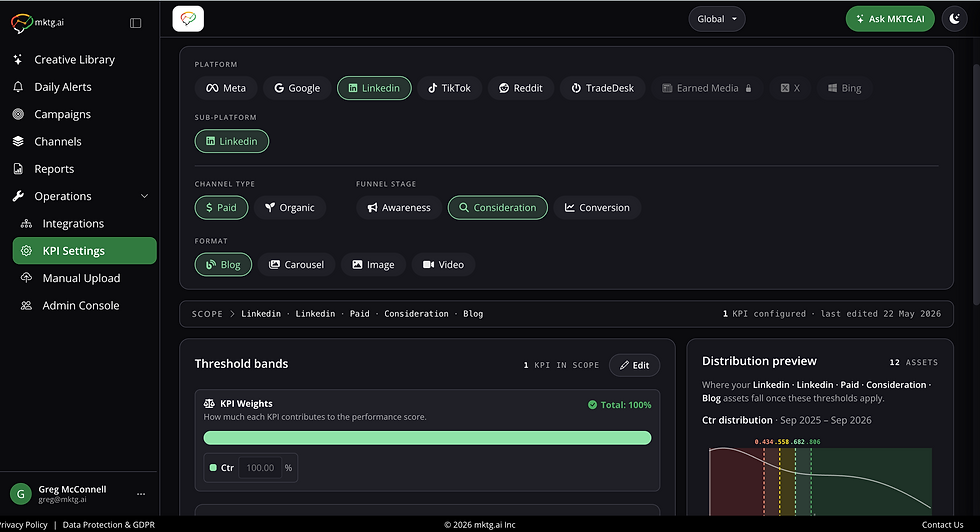
At each end point, choose the KPI that defines success, such as click-through rate, and set the cut points for Excellent, Good, Average, and Low.
If you have history, pick a date range and press Go. mktg.ai proposes thresholds from your own past results. Where history is thin, it says there is not enough data yet.
Example (illustrative). A subscription brand runs three kinds of ads. Before touching the settings, the team writes down the question each KPI has to answer:
The ad's job | The question the KPI should answer |
|---|---|
Instagram video, Awareness | Did people stop and watch? |
Facebook carousel, Consideration | Did people engage and click through? |
Meta image, Conversion | Did people sign up? |
Then they pick the KPI in each path that answers that question. Ten minutes of thinking here saves months of arguing about scores later.
Step 3: How do you add offline and pre-launch creative?
TV spots, print ads, out-of-home boards, and event materials belong in the same record as your digital work. Go to Operations, then Manual Upload.
Drag in the file (up to 30 MB; PNG, JPG, JPEG, WEBP, MP4, GIF, MP3, or PDF), then add the name, dates, channel, and owner. Your offline work now sits in the same Creative Library as everything else.

Step 4: Who should you invite first?
Open Operations, then Admin Console, and use Add User. Client Admins manage users and settings. Users work with the data.
Invite the media buyer and the creative lead on day one. The biggest gains come when the person who spends the money and the person who makes the ads are looking at the same screen.
What should your first session look like?
Block 20 minutes with one goal: leave with one decision.
Open the Creative Library and set the date to the last 30 days.
Turn on the Heat map and Sort by Spend.
Look at the colors on your ten most expensive ads. Green is working. Orange and red need attention.
Open the most expensive orange or red ad and read its Creative DNA.
Press Run Analysis and read the top item under Actions.

Example (illustrative). A team runs this session and finds three orange ads among its ten most expensive. Two of them show the logo late and never show a call to action. The team lowers the budget on both and briefs a refresh the same afternoon. One session, one decision, real money moved.
FAQ
Which platforms does mktg.ai connect to? Google (search, display, and YouTube), The Trade Desk, Facebook, Instagram, LinkedIn, TikTok, and Reddit. TV, radio, print, out of home, collateral, and events come in by upload.
Why do KPI Settings matter so much? Every Creative Performance score, heat-map color, alert, and recommendation comes from them. If a score ever looks wrong, KPI Settings is the first place to check.
Does mktg.ai score organic posts? Yes. Organic posts from connected accounts are scored on the same scale as paid ads, so you can compare them directly.
Related reading
How to use the Creative Library (post 2)
How to read the Creative Performance score (post 3)
How to run a creative performance analysis (post 10)
See every ad, its spend, and its result in one place. [Book a demo of mktg.ai.]
Comments