
How to use Ask mktg.ai

Some questions deserve an answer in seconds.

"Which platform is wasting the most spend?" "Which creative format is driving our best results?" "What should I look at first today?" You know the question. Getting the answer usually means an export, a pivot table, or a message to the one analyst who knows where the data lives.
That message can take a while to come back. In Supermetrics' Marketing Data Report 2026, a survey of 435 marketers, 50% said they wait one to three business days just to get basic questions answered by their data team. By then, the question has often been replaced by a new one.
The mktg.ai view: The best question is the one you would otherwise save for Monday's meeting. Ask it now.
Ask mktg.ai puts an analyst on call. Type or say a question and it answers from your connected marketing data.
What is Ask mktg.ai?
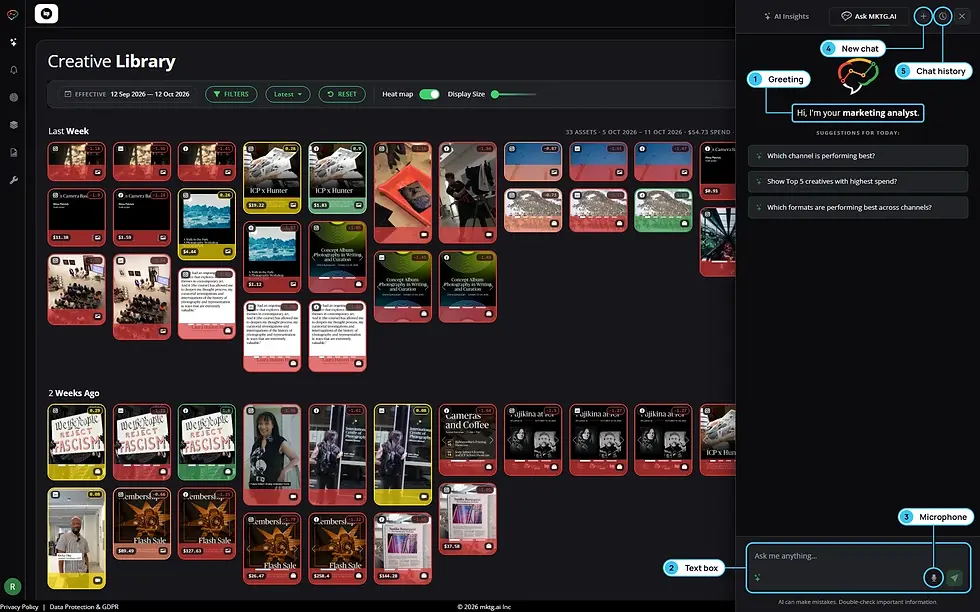
Ask mktg.ai is a chat panel available on every screen in the product. It introduces itself simply: "Hi, I'm your marketing analyst." It works from the same record as the rest of mktg.ai: every ad, the money behind it, and the result it produced.
How do you open Ask mktg.ai?
Open it from any page and a panel slides in on the right. You will find:
A text box for typing a question
A microphone for asking out loud
New chat to start a fresh topic
Chat history to return to earlier conversations
What should you ask first?
Start with a suggested question. The starter prompts change with the page you are on. In the Creative Library you might see:
"Which channel is performing best?"
"Show Top 5 creatives with highest spend"
"Which formats are performing best across channels?"

Then ask your own. Questions with one clear answer work best at the start. Group them by the decision they support:
Decision | |
|---|---|
Where is the money going? | Which platform is wasting the most spend? Show the top 10 ads by spend this month. |
What is working? | Which creative format is driving the best ROI? What are our top 5 Instagram ads this month? |
What needs attention? | Which ads have high spend and low performance? Which ads are losing performance fastest? |
How are we doing? | Which funnel stage is weakest? Which channel is performing best? |
How do you follow up?
Ask works best as a conversation. Each follow-up narrows the answer toward something you can act on, and New chat keeps unrelated topics apart so each thread is easy to find later in chat history.
Example: from a hunch to a shortlist in three questions
This example is illustrative. The answers are summarized.
"Which platform is wasting the most spend?" The answer points to Meta, where the most spend sits in underperforming creative this month.
"Show me the five worst ads on Meta by spend." The answer lists five ads, three of them vertical videos.
"What do those five ads have in common?" The answer notes that most show the brand late and several have no clear call to action.

Three questions turn "Meta feels soft" into five named ads and two creative reasons. The next step is to open those ads, confirm the Creative DNA, and decide.
How do you turn an answer into a decision?
Every useful answer points to one of three moves:
The answer shows | Decide | Where to act |
|---|---|---|
Spend on weak creative or a weak platform | What to pause or cut | Your ad platform, then a comment on the ad |
A format, channel, or ad that is working | What to fund or repeat | Your budget, and the next creative brief |
A trend moving the wrong way | What to watch or refresh | Daily Alerts and the ad's Performance tab |
When an answer names specific ads, open them before you act. Look at the score, the KPI it is based on, and the Creative DNA. A minute of checking keeps a fast answer from becoming a fast mistake.
Should you use Ask, Run Analysis, or Reports?
Use | When you want |
|---|---|
Ask mktg.ai | A quick, specific answer, especially one you would otherwise get by filtering and sorting |
Run Analysis | A full briefing on everything in view, with ranked actions and creative patterns |
Reports | A complete, shareable view of a period |

They work well together. A report shows Underperforming Spend went up. Ask tells you which platform drove it. Run Analysis on that platform tells you what to do.
FAQ
What is an AI marketing analyst? An assistant that answers plain-language questions about your marketing performance from your own data. In mktg.ai, that is the Ask mktg.ai panel.
Can you ask questions out loud? Yes. The Ask panel accepts typed or spoken questions.
Can you go back to an earlier conversation? Yes. Chat history keeps earlier threads, and New chat starts a fresh one.
Related reading
How to ask better questions in Ask mktg.ai (post 20)
How to run a creative performance analysis (post 10)
How to find wasted ad spend (post 16)
Ask your marketing data a question and get a straight answer. [Try Ask mktg.ai.]

Comments